
Entering the world of latex printing can be both exciting and overwhelming for those new to the print industry. This technology has transformed how professionals approach wide-format graphics, signage, and even textile applications. With its eco-friendly credentials and versatile output, latex-based printing is increasingly favored by designers and print shops seeking high-quality results and operational efficiency.
Whether you are a designer eager to see your creations come to life or a print operator looking to expand your service offerings, understanding the essentials of this printing method is crucial. This guide covers the core concepts, equipment, and best practices to help you get started with confidence. For a deeper dive into the benefits of latex printing and how it compares to other technologies, you can explore additional resources as you progress.
What Is Latex Printing Technology?
At its core, latex printing uses water-based inks that contain latex polymers. When heated, these polymers form a durable film on the print surface. Unlike traditional solvent-based methods, latex inks are low in volatile organic compounds (VOCs), making them safer for operators and the environment. This process is suitable for a wide range of materials, including vinyl, paper, textiles, and certain plastics.
The result is vibrant, long-lasting prints that are ready for finishing or installation almost immediately after printing. For those interested in the technical side, learning about the underlying composition and performance of latex ink can provide valuable context for choosing the right media and settings.
Key Advantages for Designers and Print Shops
Adopting latex-based systems offers several notable benefits:
- Eco-friendly operation: Water-based inks mean reduced odors and fewer hazardous emissions.
- Versatility: Compatible with a broad spectrum of substrates, from banners to wallcoverings.
- Fast turnaround: Prints are dry and ready for immediate use or lamination.
- Durability: Output resists scratching, fading, and water exposure, making it ideal for indoor and outdoor applications.
- Consistent color: Advanced ink chemistry ensures reliable, repeatable results across jobs.
These strengths make latex a popular choice for businesses aiming to deliver high-quality graphics with minimal environmental impact. To see how this technology stacks up against alternatives, you might find this comparison of latex and UV printing helpful.
Essential Equipment and Setup Tips
Getting started with this printing method requires some key equipment and careful setup. Here’s what you’ll need:
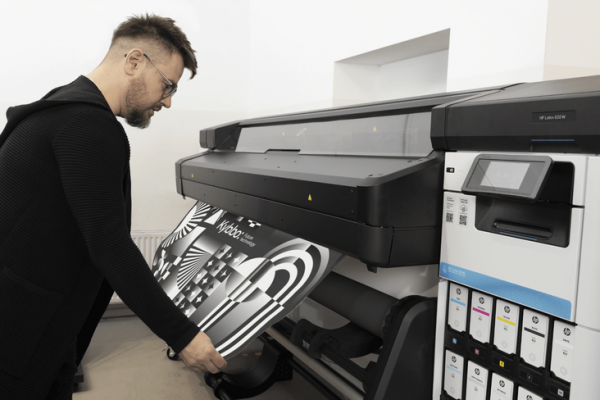
- Latex printer: Choose a model that matches your production volume and media needs. Entry-level machines are suitable for small shops, while larger units cater to high-output environments. For a foundational overview, check out this latex printer basics guide.
- Compatible media: Ensure your substrates are rated for latex inks to achieve optimal adhesion and color.
- RIP software: Raster Image Processors manage color profiles and print layouts, ensuring accurate output.
- Ventilation: While latex inks are low-odor, proper airflow is still recommended for comfort and safety.
- Maintenance supplies: Regular cleaning and periodic replacement of consumables (like ink cartridges and printheads) keep your printer running smoothly.

Workflow: From Design to Finished Print
To achieve professional results, it’s important to follow a structured workflow:
- Design preparation: Use high-resolution images and vector graphics. Calibrate your monitor for color accuracy, and set up files in the correct color space (usually CMYK).
- Media selection: Match your design intent to the right substrate. For example, choose vinyl for outdoor banners or specialty textiles for soft signage.
- RIP processing: Import your files into the RIP software. Apply the appropriate color profile and layout settings for your chosen media.
- Printing: Load the substrate and run a test print if needed. Monitor the job for any issues such as banding or color shifts.
- Finishing: Once printed, trim, laminate, or mount your output as required. Latex prints are typically dry and ready for finishing immediately.
Consistent calibration and routine maintenance are key to avoiding costly errors and ensuring your prints look their best.
Common Challenges and How to Overcome Them
Newcomers may encounter a few hurdles when adopting this technology. Here are some typical issues and solutions:
- Color inconsistencies: Regularly calibrate your monitor and printer. Use manufacturer-recommended profiles for each media type.
- Media compatibility: Always check that your substrate is designed for latex inks. Incompatible materials may cause poor adhesion or color distortion.
- Printhead clogs: Follow the printer’s maintenance schedule and use genuine consumables to reduce downtime.
- Environmental factors: Maintain stable temperature and humidity in your print room to prevent warping or ink drying issues.

Expanding Your Knowledge and Staying Current
As with any evolving technology, staying informed about the latest advancements is essential. Industry trends, new materials, and improved ink formulations can all impact your workflow and output quality. For a historical perspective, you may want to read about the history of latex printing and how it has shaped today’s market.
Additionally, keeping up with the latest trends in latex printing will help you anticipate customer demands and adopt best practices as they emerge.
Frequently Asked Questions
What types of media are compatible with latex printing?
This technology works well with a wide range of substrates, including self-adhesive vinyl, banner materials, textiles, paper, and some plastics. Always check that your chosen media is labeled as latex-compatible for best results.
How does latex printing compare to solvent or UV printing?
Latex inks are water-based and emit fewer odors and VOCs than solvent inks, making them safer for indoor environments. Compared to UV printing, latex offers similar durability but typically dries faster and is more flexible for certain applications. For a detailed comparison, see this in-depth look at latex vs. UV printing.
What maintenance is required for latex printers?
Routine maintenance includes cleaning printheads, replacing ink cartridges, and keeping the printer’s environment stable. Following the manufacturer’s guidelines and using genuine supplies can help minimize downtime and extend the life of your equipment.