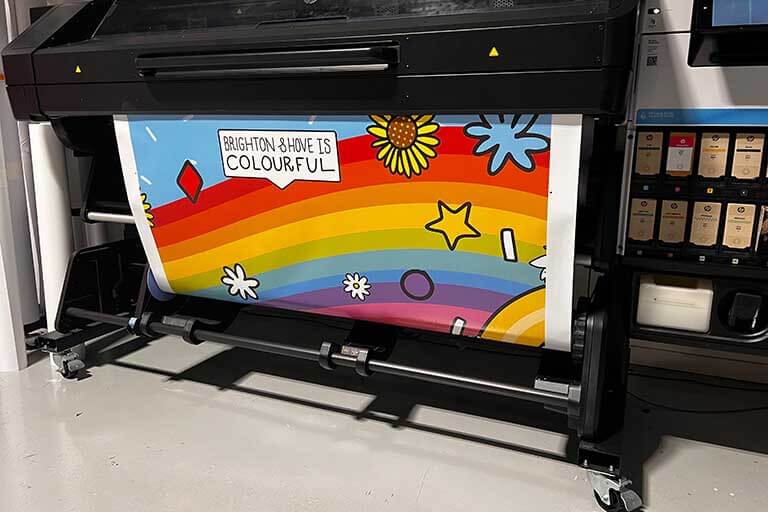

Printing on canvas with latex printer technology has become a preferred choice for artists, photographers, and print shops seeking vibrant, durable, and eco-friendly results. Latex printers offer a unique combination of water-based inks, fast drying times, and compatibility with a wide range of media, making them especially suitable for canvas applications. In this guide, you’ll find practical advice on how to achieve professional-quality canvas prints, from preparing your files and selecting the right canvas to optimizing printer settings and finishing your artwork.
Whether you’re new to latex printing or looking to refine your process, understanding the nuances of canvas as a substrate and the capabilities of latex ink systems is essential. We’ll explore key setup steps, color management, and troubleshooting tips to help you produce stunning, gallery-ready prints.
For those interested in expanding their latex printing skills beyond canvas, you might also find value in learning how to print on vinyl using latex ink for professional results.
Understanding Canvas and Latex Printing Technology
Canvas is a textured, woven fabric, typically made from cotton or polyester, designed to absorb ink while maintaining structural integrity. When paired with latex printers, which use flexible, water-based inks cured by heat, the result is a print that is both vivid and resistant to cracking or fading.
The main advantages of using latex printers for canvas work include:
- Eco-friendly ink formulation with low VOC emissions
- Immediate handling and finishing due to rapid drying
- Excellent color vibrancy and sharpness
- Compatibility with a wide range of coated and uncoated canvases
If you want to dive deeper into the technology, this overview of latex printers provides a comprehensive look at how these machines work and what makes them suitable for various printing applications.
Preparing Your Canvas and Workspace
Proper preparation is crucial for achieving consistent, high-quality results when working with canvas and latex printers. Start by selecting a canvas that is specifically rated for inkjet or latex printing. These canvases are typically pre-coated to ensure optimal ink absorption and color reproduction.
Before loading the canvas, inspect it for dust, wrinkles, or imperfections. Use lint-free gloves to handle the material and avoid touching the printable surface. Ensure your workspace is clean and free from airborne particles that could settle on the canvas during printing.
For best results, store canvas rolls in a climate-controlled environment and allow them to acclimate to the print room temperature before use. This helps prevent curling or uneven tension during printing.
For more on getting your media ready, check out these tips on how to prepare media for latex printing.
File Preparation and Color Management for Canvas Printing
Achieving accurate, vibrant colors on canvas requires careful file preparation and color management. Start by working in a color space that matches your workflow, such as Adobe RGB or sRGB, and ensure your monitor is calibrated for consistent viewing.
When editing images, consider the texture and absorbency of canvas, which can slightly mute colors and soften fine details. Increase contrast and sharpness slightly to compensate for this effect. Always export your files at the correct resolution—typically 150–300 DPI at final print size.
Use ICC profiles provided by your canvas manufacturer or printer supplier to ensure accurate color reproduction. These profiles adjust the printer’s output to match the specific characteristics of your chosen canvas and ink combination.
For advanced users, calibrating your latex printer regularly is essential for consistent results. Learn more about how to calibrate latex printers and best profiles for latex printing to maintain color accuracy.

Printer Settings and Techniques for Canvas Output
Optimizing your printer settings is key to producing sharp, vibrant canvas prints. Begin by selecting the appropriate media type in your printer’s software—most latex printers include presets for various canvas types. If your canvas is not listed, use a generic matte or fine art preset and adjust as needed.
Set the print quality to “high” or “fine art” for the best results. This increases the amount of ink laid down and enhances detail. Adjust the curing temperature and airflow according to the canvas manufacturer’s recommendations; too much heat can cause warping, while too little may result in incomplete curing.
Use the printer’s built-in edge guards or tensioning systems to keep the canvas flat and prevent head strikes. Always perform a nozzle check and alignment before starting a new print job to avoid banding or color inconsistencies.
For more in-depth advice on achieving optimal color, see these pro tips for color accuracy in latex printing.

Finishing and Protecting Your Canvas Prints
Once your canvas print is complete, allow it to cool and cure fully before handling. While latex inks are dry to the touch immediately, letting the print rest for a few hours ensures maximum durability.
For added protection, consider applying a clear, water-based varnish or spray designed for canvas. This step enhances scratch resistance and provides UV protection, extending the life of your artwork.
When stretching the canvas over a frame, use gentle, even tension to avoid cracking or distorting the print. Trim excess material carefully, and use acid-free tape or staples to secure the canvas to the stretcher bars.
Troubleshooting Common Issues in Canvas Printing
Even with careful setup, you may encounter challenges such as banding, color shifts, or ink smudging. Here are some practical solutions:
- Banding: Run a nozzle check and clean printheads if needed. Ensure the canvas is loaded flat and tensioned properly.
- Color shifts: Double-check your ICC profiles and monitor calibration. Use the correct media preset in your printer driver.
- Ink smudging: Increase curing temperature or airflow, and verify that the canvas is compatible with latex inks.
- Canvas warping: Lower the curing temperature or try a different canvas brand with better heat resistance.
Regular maintenance and calibration of your latex printer will help minimize these issues and ensure consistent, high-quality results.
Frequently Asked Questions
What type of canvas works best with latex printers?
For optimal results, use a canvas that is specifically rated for inkjet or latex printing. These canvases are pre-coated to absorb latex inks efficiently, resulting in vibrant colors and sharp details.
How do I prevent color fading on my canvas prints?
Latex inks are naturally resistant to fading, but for maximum longevity, use a UV-protective varnish or spray after printing. Displaying prints away from direct sunlight also helps preserve color.
Can I use generic media profiles for canvas printing?
While generic profiles can work in a pinch, using ICC profiles tailored to your specific canvas and printer model is recommended for the most accurate color reproduction. Many manufacturers provide downloadable profiles for their media.