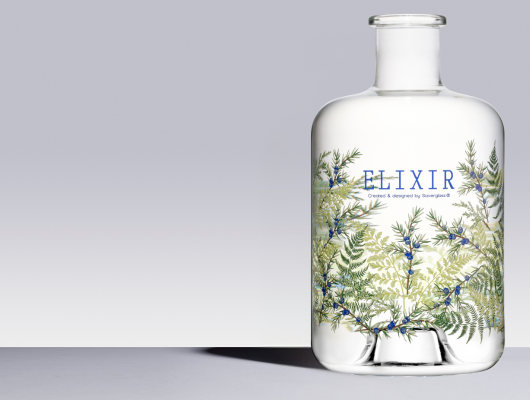

Glass printing is a specialized process that brings vibrant designs and essential information to bottles, jars, and other glassware. However, even with advanced techniques, issues can arise that affect the final product’s appearance and durability. Recognizing common glass printing defects early is crucial for maintaining quality and ensuring customer satisfaction. This article provides a practical overview of typical flaws, how to identify them, and what steps can help prevent these issues in production.
For those looking to deepen their understanding of pitfalls in this field, our guide on common mistakes in glass printing offers additional insights and solutions.
Understanding Defects in Glass Printing
Printed glass products are used across industries, from cosmetics to automotive and electronics. The quality of the print directly impacts both aesthetics and function. Defects can result from issues with the substrate, ink, equipment, or environment. Identifying these flaws quickly helps minimize waste and maintain brand reputation.
Some of the most frequent problems include misalignment, smudging, poor adhesion, and color inconsistencies. Each defect has distinct characteristics and causes, which are explored in detail below.
Key Types of Glass Print Flaws
Misregistration and Alignment Issues
One of the most visible glass printing defects is misregistration, where the printed image or text does not align correctly with the intended area. This can result in overlapping colors, blurred edges, or off-center designs. Misregistration often occurs due to improper setup of the printing machine, slippage of the glass item during printing, or inaccurate screen placement.
- How to spot: Look for images or text that appear shifted, double-printed, or not centered on the glass.
- Prevention: Regular calibration of equipment and careful alignment before each run are essential.
Ink Smudging and Blurring
Smudging happens when the ink does not dry properly or is disturbed before curing. This leads to blurred lines, streaks, or a hazy appearance. Environmental factors like humidity, as well as incorrect ink formulation, can contribute to this problem.
- How to spot: Examine the print for fuzzy edges, streaks, or areas where colors bleed into each other.
- Prevention: Use inks suitable for glass, maintain correct drying times, and control the printing environment.
Poor Ink Adhesion
Poor adhesion is a frequent concern in glass decoration. If the ink does not bond well to the glass surface, it may peel, flake, or wash off easily. This is often due to inadequate surface preparation, such as insufficient cleaning or failure to use a primer.
- How to spot: Gently scratch the printed area; if ink comes off easily, adhesion is poor.
- Prevention: Clean glass thoroughly before printing and use recommended primers or surface treatments.
Other Frequent Printing Problems
Color Inconsistencies
Consistent color is vital for branding and product appeal. Variations in hue or opacity can occur due to uneven ink application, changes in temperature, or using different ink batches.
- How to spot: Compare multiple printed items side by side for noticeable differences in color or transparency.
- Prevention: Standardize ink batches and monitor environmental conditions during production.
Pinholes and Voids
Pinholes are tiny unprinted spots that appear where the ink fails to cover the glass. These are usually caused by dust, oil, or moisture on the surface prior to printing.
- How to spot: Inspect the print under good lighting for small, clear dots or gaps in the design.
- Prevention: Ensure glass is free from contaminants and handle with gloves to avoid fingerprints.
Ghosting and Shadowing
Ghosting refers to faint, unintended images or shadows that appear alongside the main print. This can result from residual ink on screens or rollers, or by double exposure during the process.
- How to spot: Look for pale outlines or duplicated elements near the intended design.
- Prevention: Clean all printing equipment thoroughly between runs and avoid overlapping exposures.

How to Identify Glass Printing Defects Quickly
Fast detection of flaws is essential for quality control. Here are some practical steps to spot issues during and after production:
- Visual inspection: Examine each item under bright, even lighting to catch misprints, color issues, or surface defects.
- Tactile testing: Run a finger over the print to feel for raised ink, rough patches, or flaking.
- Adhesion tests: Use gentle scratching or tape tests to check if the ink is firmly bonded.
- Batch comparison: Line up several pieces to look for inconsistencies in color, registration, or finish.
Incorporating these checks at multiple stages—immediately after printing, after curing, and before packaging—helps catch problems before products reach customers.
Causes and Prevention of Printing Flaws
Understanding the root causes of glass print defects is key to prevention. Common sources include:
- Surface contamination: Dust, oil, or moisture can prevent ink from adhering properly.
- Incorrect ink or curing: Using the wrong type of ink or insufficient curing time can lead to smudging and poor durability.
- Equipment misalignment: Poorly calibrated machines cause registration and ghosting issues.
- Environmental factors: High humidity or temperature swings affect ink drying and color consistency.
To minimize these risks:
- Clean glass thoroughly before printing and use gloves to handle items.
- Regularly calibrate and maintain printing equipment.
- Choose inks and curing processes designed for glass substrates.
- Monitor and control the production environment.
For an in-depth look at advanced methods and coatings used in high-precision applications, see our article on smart device glass printing.
Industry Standards and Best Practices
To maintain high quality, manufacturers follow strict standards and best practices. These include regular training for staff, investing in modern printing technology, and performing routine audits. For a comprehensive overview of printing techniques and their impact on quality, visit this resource on glass printing techniques.
In addition to technical improvements, clear communication between design, production, and quality control teams helps reduce errors and ensure consistent results.
Related Applications and Trends
Glass printing is not limited to decorative bottles. It plays a vital role in sectors like automotive, electronics, and interior design. For example, automotive glass printing technology relies on flawless prints for safety and branding, while industrial glass printing uses span from appliance panels to architectural features.
Emerging trends include digital printing, eco-friendly inks, and advanced coatings that enhance durability and color vibrancy. For those interested in creative applications, our guide to colored glass decoration methods explores innovative ways to achieve unique looks.
FAQ
What are the most common defects in glass printing?
The most frequent issues include misregistration, ink smudging, poor adhesion, color inconsistencies, pinholes, and ghosting. Each can be identified by visual inspection and addressed with proper process controls.
How can I prevent ink from peeling off printed glass?
Ensure the glass surface is clean and free from contaminants, use the correct ink and primer, and follow recommended curing procedures. Regular equipment maintenance also helps prevent adhesion problems.
Why do colors sometimes look different on printed glass items?
Color variations can result from inconsistent ink batches, changes in temperature or humidity, or uneven application. Standardizing materials and controlling the production environment are key to achieving uniform results.
Where can I learn more about advanced glass printing techniques?
For further reading, check out this detailed guide on glass printing techniques covering screen, digital, and specialty processes.